
So, You’ve just bought a new Day Night Sensor for your street light or outdoor lamp. You’ve got the wires placed out in front of you. Black, Red, White. Three wires, three terminals. Looks simple enough, right?
Then you look at the diagram. You guess yourself if you connect something wrong.
Next morning? Your sensor is damage Or even worse than that — it’s a fire hazard waiting to happen.
Honestly, this happens more than people admit. And 90% of the time, it’s not because the sensor is bad. It’s because someone seized the wrong amperage sensor for the job, or wired it wrong.
So today, let’s fix that. For real.
First, What Even Is a Day Night Sensor?
Quick recap for anyone new here. A Day Night Sensor (also called a Day Night Light Sensor or a Day Night Switch Sensor) is basically a photocell switch. It detects ambient light levels and automatically turns your lamp ON when it gets dark and OFF when it gets bright again. You don’t have any need to fix timer manually, as it has a fixed timer inbuilt, it works as an automatic light control.
Day Night sensor use everywhere in today’s time like: street lights, parking lots, factory perimeters, warehouses, garden lamps, porch lights. And they’re genuinely useful. According to the U.S. Department of Energy, automated lighting controls can cut lighting energy use by up to 30–60% in commercial and industrial settings. That’s not a small number. For a factory running 24/7, that’s lakhs saved every year.
At 1 LEAP Technologies, we deal in these sensors and we see both ends of it — the right installations that work perfectly for years, and the wrong ones that people call us about after something melts.
So let’s talk about how you can save your sensor from burn, damage or melt due to wrong connection.
The Two Wire Diagrams You Need to Understand
Here’s what most people skip before and pay for it later. The wiring diagram for your Day Night Switch Sensor is NOT frustrating— but it is specific. Let’s break down both setups shown in the manual.
Setup 1: For Incandescent Lamps (Direct Load Connection)
Look at the diagram. Three wires come out of the sensor body:
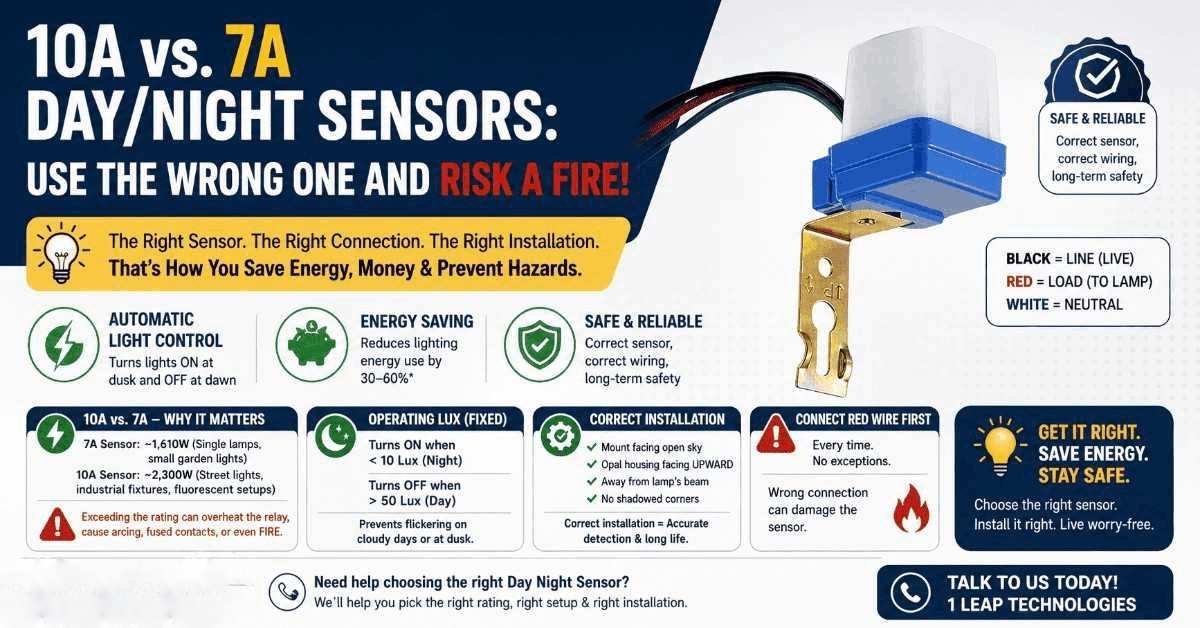
- BLACK — this is your Line (Live input from 230V AC)
- WHITE — this is your Neutral (Common)
- RED — this is your Load output going to the lamp
Here’s exactly how it connects:
- Step 1: Connect the Black lead wire to your 230V AC live supply.
- Step 2: Connect the White lead wire (common/neutral) to your 230V AC neutral.
- Step 3: Connect the Red lead wire along with the White lead directly to your incandescent lamp load.
That’s all it. Three wires. Clean and direct. The sensor sits between your power source and your lamp, interrupting the live circuit when daylight is detected.
So the RED + WHITE wire will go to the lamp. BLACK + WHITE come from the supply. Got it?
Also, it is important to note:- connect the Red wire first before you touch anything else. The manual says it. We’re reminding you it again. Red wire first. Safety isn’t optional, safety is your responsibility.
Setup 1: For Incandescent Lamps (Direct Load Connection)
This one in which people stuck up because there’s an extra component in the chain — the stabilizer (ballast).
With fluorescent or mercury lamps, you don’t connect the Day Night Light Sensor directly to the lamp. Instead:
Connect the sensor to the PRIMARY SIDE of the stabilizer.
The diagram shows it clearly. The sensor output (RED wire) feeds into the stabilizer’s primary input. The stabilizer then drives the lamp on its secondary side. The LED indicator on the sensor side confirms it’s live and working.
Why the stabilizer? Because mercury and fluorescent lamps need a ballast to regulate current. If you skip the stabilizer and you wire it directly like an incandescent setup — you’ll damage both the lamp and the sensor immediately.
Again point to be noticed: Red lead wire first. Always.
10A vs. 7A — Why This Gap Can Cost You Dearly
Here’s the most important part which major buyers don’t think about until something doesn’t work in their favour.
Day Night Sensors are usually available in different current ratings. The two most common you’ll encounter in the Indian market are 7A and 10A.
What does that mean in real life?
Sensor | Max Load (230V AC) | Suitable For |
|---|---|---|
7A Day Night Sensor | ~1,610 Watts | Single lamps, small garden lights |
10A Day Night Sensor | ~2,300 Watts | Street lights, industrial fixtures, fluorescent setups |
Now here’s the most scary and important part, which most of the customer doesn’t take seriously and then they start blaming sensor. If you connect a 10A load — say, a 250W mercury vapour street lamp — through a 7A day night sensor, you’re drawing more current than the sensor’s internal relay is made for.
Check this out: the relay inside the sensor starts heating up Slowly at first Then it arcs, Then the contacts fuse. After this you have either a permanently closed circuit (lamp never turns off) or a fire risk inside a weatherproof housing where nobody is looking for just due to provide more load than its capacity.
That’s not a theoretical risk, we are talking about here. That’s what happens with peoples In reality.
So the rule is simple: always match your sensor rating to your load, with headroom. If your lamp draws 8A, get the 10A day night sensor. Don’t cut it close, and also never ignore this.
👉 Not sure which rating suits your setup? Talk to us at 1 LEAP Technologies — we’ll sort it out for you in two minutes for the best use of your sensor.
The Operating Lux Settings (And Why They Matter)
Here’s some data from the sensor specifications that people often ignored.
The Day Night Light Sensor we are talking about in this guide is (non-adjustable) lux limit:
- Turn ON: Less than 10 Lux
- Turn OFF: Less than 50 Lux
So the sensor switches your lamp ON when ambient light drops below 10 Lux — basically deep dusk or at the nighttime. It turns OFF when light come back above 50 Lux — in early morning.
Why the gap between 10 and 50? That’s a time-dependence band. It prevents the lamp from immediately flickering on and off during cloudy days or at dusk when light levels hover near the pre decided lux limit.
This fixed setting means you don’t need to configure anything manually by yourself, But it also means placement matters a lot in a sensor, which brings us to the next section to its proper working.
Correct vs. Incorrect Installation — This Is Where It Gets Real
Wiring right is one step away. Installing it in the right location is step two. And honestly, step two is where most DIY installations fails as location matters a lot for its proper detection.
What Correct Installation Looks Like
The diagram in the manual shows three correct mounting scenarios:
- Scenario 1: Flat on a wall, facing open sky The sensor housing faces upward and outward, away from the wall surface. It can read natural ambient light without any type of obstruction. This is the ideal or right setup.
- Scenario 2: On a bracket or extended arm The sensor is mounted on an extended bracket, away from the wall. Same logic — it needs clear exposure to natural daylight to function correctly and function accurately.
- Scenario 3: On a pole or mast Classic street light mounting. The Day Night Switch Sensor sits at the top of the pole, exposed to open sky from multiple directions.
One critical note from the specifications: Install the control unit with the opal (white/milky) housing facing UPWARD. The photocell element inside reads light from above. If you flip it, it reads ground-reflected light — which behaves very differently from sky light and works oppositely your exectaions.
What Correct Installation Looks Like
The manual marks certain placements with an X for a reason. Avoid these placements highly recommended:
- Don’t mount it in a permanently shadowed corner. If the sensor sits in a spot that’s artificially dark all day — like under an overhang, inside a deep recess, or behind a wall — it will think it’s nighttime 24 hours a day. Your lamp stays on forever. You pay for electricity you don’t have to pay.
- Don’t mount it anywhere your own lamp can shimmer on it. This is the basic mistake. If the sensor can “see” the light it’s supposed to be controlling, you create a feedback loop. Lamp turns on → sensor sees light → thinks it’s daytime → turns lamp off → ambient light drops → sensor thinks it’s night → turns lamp on again. Your lamp will flicker all night. Your neighbours will hate you for this.
The diagram specifically warns: Do not install the control unit in a place directly affected by the lighting of the turning-ON lamp.
So always makes sure the sensor is placed away from the beam angle of the lamp it controls.
A Caution That's Actually Reassuring
Here’s something from the manual that catches people off guard when they first install.
If you’re installing during daytime, the unit may turn ON shortly and then turn OFF within 3 minutes. Don’t be tense That’s normal operation. The sensor is adjusting itself. It turns on because the installation itself might can confuse in detecting the natural light. Within 3 minutes, it reads the ambient light correctly and will be off again.
The most important thing you should keep in your mind:- misconnection can damage the control unit. So if your sensor doesn’t behave normally after 3 minutes please check your wiring before thinking that the sensor have some fault.
Real-World Impact: Why These Sensors Matter Beyond Your Front Gate
Let’s zoom out for a second. The Day Night Sensor you’re installing isn’t just a comfort gadget for you. It’s a part of global shift in how energy is going to be managed.
Some real numbers to chew on:
- Smart lighting controls including photocell sensors can reduce that by up to 50% in outdoor and street lighting applications.
- In India, the UJALA scheme — one of the world’s largest LED lighting rollouts — combined with automated switching controls has saved an overall 46 billion kWh of energy annually as per recent reports.
- For factory owners specifically, automated day/night switching overall human error no more lights left on overnight because just because someone forgot to off the switch. That alone can manage for 10–20% of lighting waste in small manufacturing units.
A properly installed Day Night Light Sensor pays for itself. Usually within months, not years.
A Quick Checklist Before You Wire Anything
Alright, so before you touch even a single wire, you must have go through this.
- Identify your load type. Incandescent or fluorescent/mercury? Your wiring path is different for each sensor, if you choose it can damage your whole circuit.
- Calculate your load current. Lamp wattage ÷ 230V = current in amps. Match or exceed this with your sensor rating, if it’s exceeds then choose the right one.
- Check your wire colours. Black = Live input. Red = Load output. White = Neutral/Common.
- For fluorescent/mercury lamps: connect to the PRIMARY side of the stabilizer. Not the lamp directly, as if your connect it directly it will not work, or can be damaged.
- Connect Red wire first. Every time there are No exceptions regard this.
- Plan your mounting location. Open sky above. Away from your own lamp’s beam. Opal housing facing up.
- Install during daytime knowing it may briefly turn on. Give it 3 minutes before worrying as it adjusts itself to detect the natural light.
Want a Sensor That's Already Tested for Indian Conditions?
Here’s where we come in
At 1 LEAP Technologies, we don’t just sell Day Night Sensors. We help you pick the right one for your specific setup. 7A for smaller residential loads. 10A for street lights, industrial fixtures, and fluorescent setups with stabilizers. And we make sure you have the wiring clarity you need before anything gets connected.
👉 Thinking about upgrading your outdoor lighting to automated switching? Drop us a message. We’ll help you figure out the right sensor, the right rating, and the right install method — before something gets damage or fried.
Want a Sensor That's Already Tested for Indian Conditions?
A Day Night Switch Sensor is one of the simplest, most effective tools for automated lighting. Three wires. Two setups. One correct installation location. And very important is amperage choice.
Get the wrong amperage and you’re looking at failing your sensor, possible fire risk, or a relay that fuses shut. Get the installation location wrong and your sensor either keeps the light on forever or creates a flicker loop.
Get the wiring wrong and you damage the unit before it even runs for a day. But get it right? You get a system that works silently, and automatically — day in, day out for years.
So take the 5 extra minutes. Read the diagram. Check the rating. Mount it correctly for proper use. Your future electricity bill — and your sensor — will thank you.